

Subscription Tiers
Swig offers four subscription tiers to match your needs: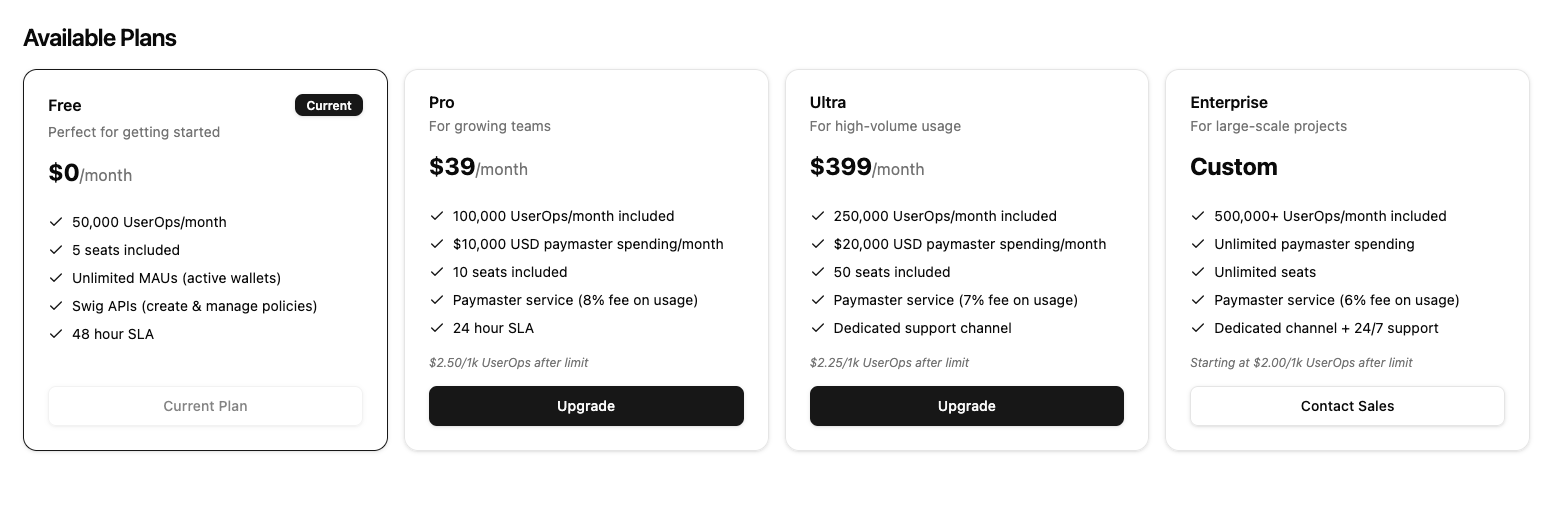
Managing Your Subscription
Viewing Current Plan
- Log in to the Developer Portal
- Go to Billing in the sidebar
- View your current tier, usage, and limits
Upgrading Your Plan
- Go to Billing in the sidebar
- Click Upgrade
- Select your desired tier
- Complete the Stripe checkout
- Your new features are available immediately
Downgrading Your Plan
- Go to Billing in the sidebar
- Click Change Plan
- Select a lower tier
- Confirm the change
- The change takes effect at your next billing cycle
Billing Portal
Access the Stripe billing portal for:Payment Methods
- Add or remove credit cards
- Set a default payment method
- Update billing information
Invoices
- View invoice history
- Download invoices as PDF
- See payment status
Subscription Details
- View current subscription
- See next billing date
- Cancel subscription
- Go to Billing in the sidebar
- Click Manage Billing or Billing Portal
- You’ll be redirected to Stripe
Usage Tracking
UserOps Usage
Track your UserOps consumption:- Monthly limit - Maximum UserOps included in your tier
- Current usage - UserOps used this month
- Remaining - Available UserOps before overage
Paymaster Usage
Track your paymaster spending:- Monthly limit - Maximum USD value sponsored
- Current usage - USD value spent this month
- Remaining - Available budget
- Total transactions sponsored
- Total SOL spent
- USD value (at transaction time)
Viewing Usage
- Go to Billing in the sidebar
- View the Usage section
- See current period metrics
Overage Handling
What Happens at Limit
When you reach your UserOps limit:- Additional UserOps are billed at your tier’s overage rate
- You’re notified of the overage
- An overage invoice is generated
Overage Rates (UserOps)
Limit Multiplier
After paying an overage invoice:- Your limit is temporarily increased
- This helps prevent service interruption
- Resets at the start of the next billing period
Usage Notifications
Swig sends notifications at key usage thresholds:
Configure notifications in your project settings.
Enterprise Features
Custom Limits
Enterprise customers can configure:- Custom UserOps limits
- Custom paymaster spending limits
- Custom pricing tiers
Low Balance Alerts
For Enterprise accounts:- Set a low balance threshold
- Receive alerts when paymaster balance is low
- Configure alert recipients
Manual Management
Enterprise subscriptions can be:- Manually managed by Swig
- Not synced from Stripe
- Customized per agreement
Billing Cycle
Monthly Billing
- Billed on the same day each month
- Usage tracked from period start to end
- Limits reset at the start of each billing period
Period Reset
At the start of each billing period:- Usage counters reset to zero
- Limit multiplier resets (if applied)
- New billing cycle begins
Cancellation
Canceling a Subscription
- Go to Billing in the sidebar
- Click Cancel Subscription
- Confirm the cancellation
- Access continues until period end
After Cancellation
- Downgraded to FREE tier
- Paymaster access removed
- Extra team members may lose access
- Data is retained
Reactivating
To reactivate after cancellation:- Go to Billing
- Select a paid tier
- Complete payment
FAQs
When is my billing date?
Your billing date is the day you started your subscription. View it in the Billing section.Can I get a refund?
Contact support for refund requests. Refunds are handled on a case-by-case basis.What payment methods are accepted?
We accept all major credit cards through Stripe:- Visa
- Mastercard
- American Express
- Discover
Is there a free trial?
The FREE tier is always available with 50,000 UserOps/month. This is a great way to try out Swig before upgrading.How do I get Enterprise pricing?
Fill out the Enterprise Contact Form on the Billing page in the Developer Portal to discuss custom Enterprise pricing.Next Steps
- Create a paymaster to sponsor transactions
- Invite team members to collaborate
- Set up API keys for your applications